
Downloading Sectional Data into Proform
If you have subscribed to sectional data in Proform* then you will notice in the title bar at the top left it says (SECTIONALS), like this:-

When you press the download button in Proform it will now also check for sectional data and if any is ready on our servers it will download and install it with progress information at the top of Proform, in green, like this:-

(Click image for larger version)
Sectional Counter
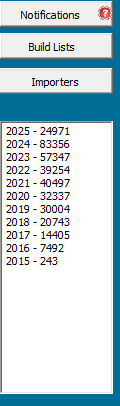
At the bottom of the button bar in Proform on the right there is a counter to show how much sectional data is store for each year.
2024 and earlier should stay the same count so you can check that against this screen shot above.
However some of the data can change or be fixed so we have created a log file so you can see what is downloaded each time the download button is pressed, more on this later.
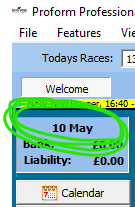
If you can not see the sectional counter because your screen resolution is small, then you can click on the date at the top of the button bar and the counter will display over the buttons.
To see the buttons again, just close and re-open Profrom.
Log File
Every time you press the download button in Proform or it auto runs a login file is created in the folder C:\ProformP\Log
The log files have a date against them so you can see what is downloaded each date.
IMPORTANT
If you are exporting data, then it is important that you check these log files because we may have automatically updated sectional data for anytime in the past!
*requires a subscription to TPD for the raw data. If you wish to subscribe then drop us an email at proformracing@gmail.com