
Save Daily Stats as Alerts
Save Daily Stats as Alerts
Turn any statistic into a personalised alert — get notified when future runners match
A feature only available on Proform Racing
What Are Stat Alerts?
Proform Racing’s Daily Stats tab shows how trainers, jockeys, sires, and other connections perform under conditions specific to each day’s racing. Stat Alerts let you save any standout statistic as a personal alert. When a future runner matches those conditions, you receive an email notification — so you never miss a profitable angle.
This feature is unique to Proform Racing. No other horse racing website offers the ability to save individual statistics and receive automated match notifications.
Contextual Statistics
Stats adapt to the specific course, distance, going, and race type of each race automatically.
One-Click Save
Click the bell icon next to any stat row to save it as a personal alert instantly.
Personal Notes
Add your own analysis and reminders to each alert. Notes persist across sessions.
Email Notifications
Receive email alerts when future runners match your saved statistics.
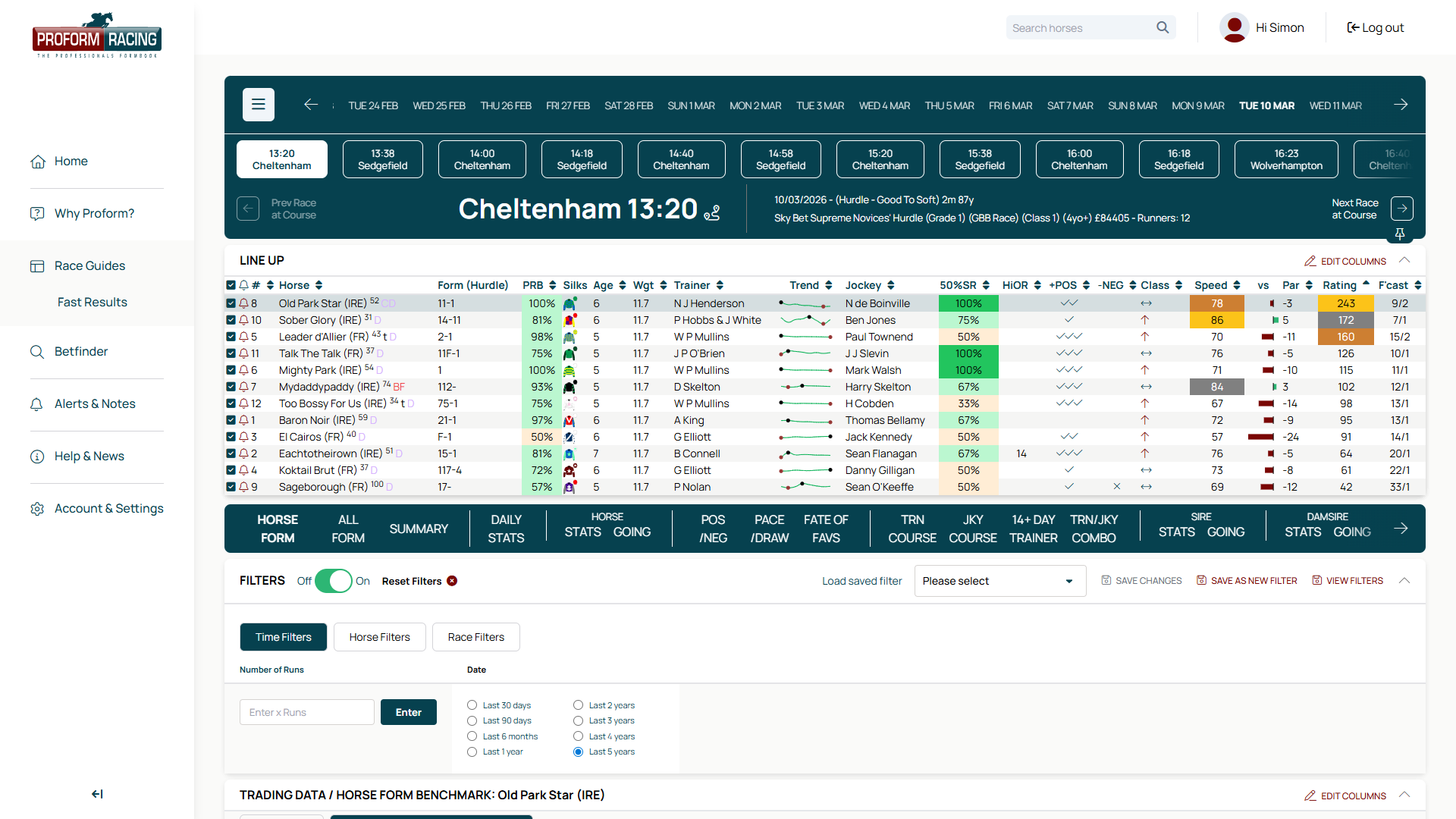
Step 1 — Open Daily Stats
Navigate to Race Guides and select any race. Below the runners table you’ll see a row of data tabs. Click Daily Stats to view performance statistics tailored to that race’s conditions.
Daily Stats has sub-tabs that let you switch between different connection types: Horses, Trainers, Jockeys, Trn/Jky, Sire, Damsire, and In Running.
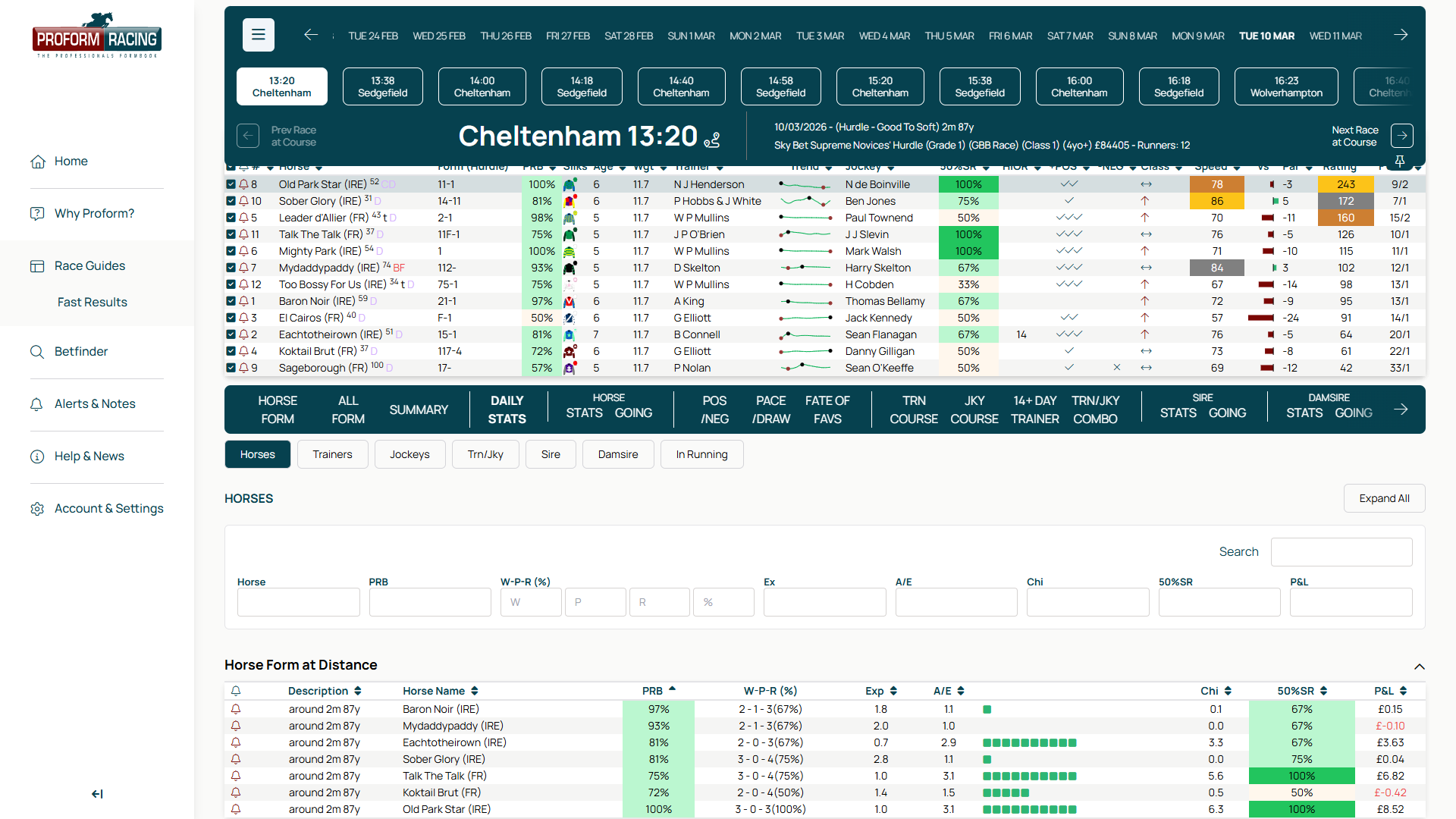
Step 2 — Understanding the Statistics
Each sub-tab contains expandable sections with detailed statistics. Here are the key columns you’ll see across all sub-tabs:
| Column | What It Means |
|---|---|
| PRB | Percentage of Rivals Beaten — a measure of how well the connection performs relative to the field. Above 50% is positive. |
| W-P-R (%) | Wins – Places – Runs with strike rate percentage. For example, “12 – 18 – 54 (22%)” means 12 wins from 54 runs. |
| A/E | Actual to Expected ratio. Above 1.0 means the connection wins more often than market prices imply — a key value indicator. |
| Chi | Chi-squared significance. Higher values mean the pattern is statistically meaningful, not just luck. |
| P&L | Profit and Loss to £1 level stakes. Green = profitable, red = loss. |
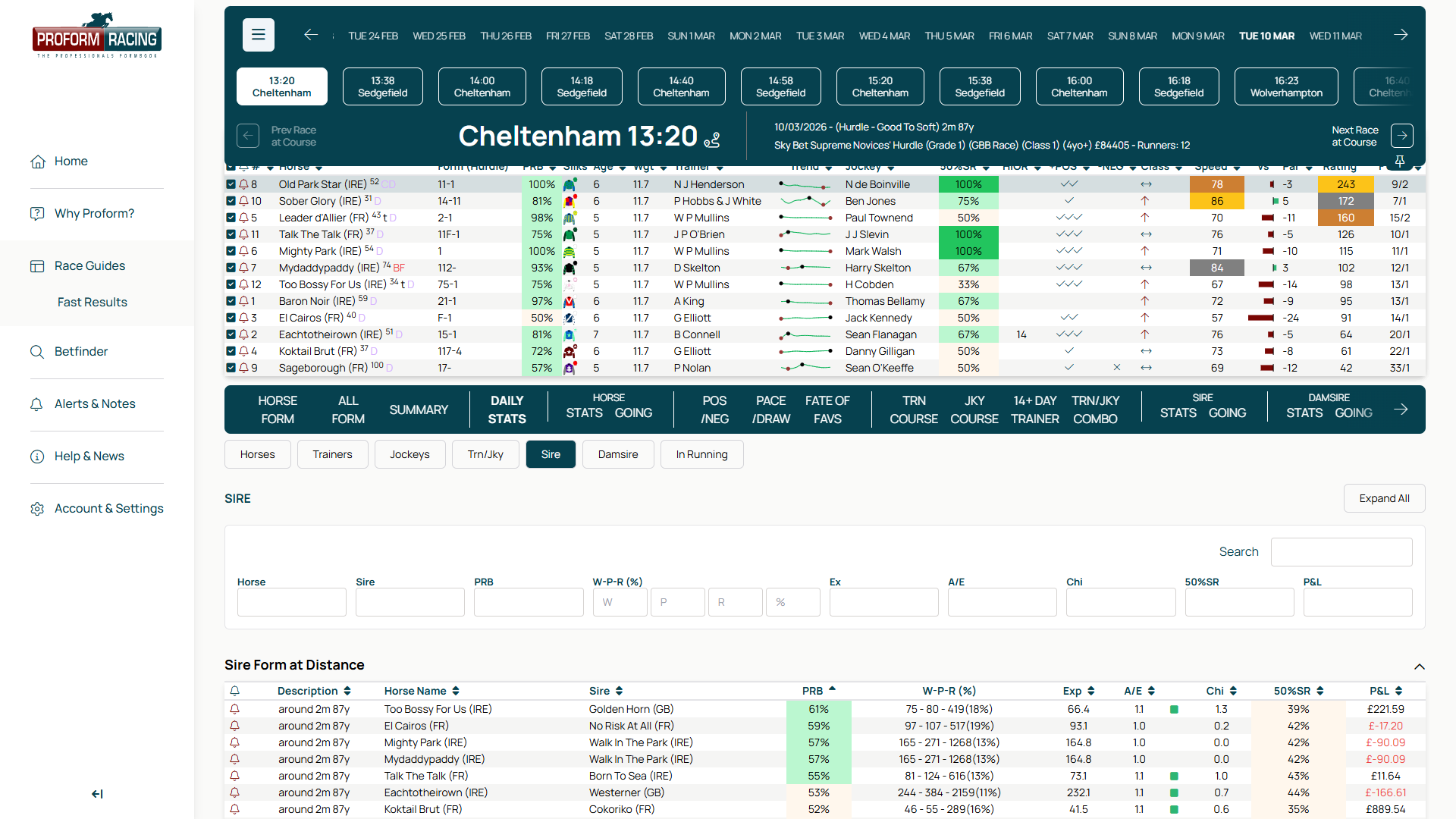
The Sire and Damsire sub-tabs are especially valuable for identifying bloodline advantages at specific courses or over certain distances. Look for high A/E ratios and positive P&L figures to spot profitable patterns.
Step 3 — Save a Stat as an Alert
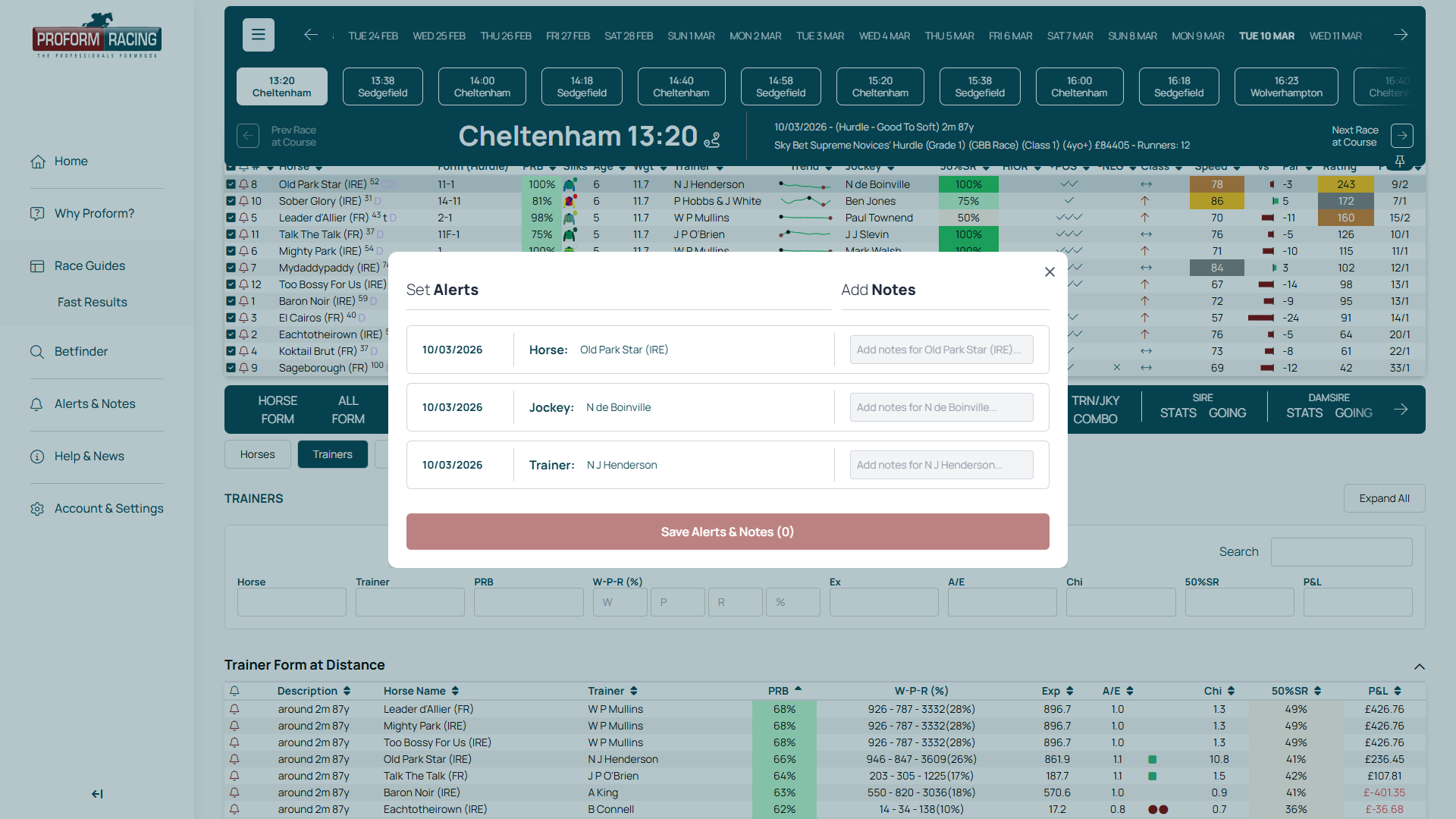
This is the feature that makes Proform unique. Next to each stat row you’ll see a bell icon. Click it to open the alert dialog.
The dialog shows you exactly what will be saved:
- ✓Horse — the horse this stat relates to
- ✓Trainer / Jockey / Sire — the connection being tracked
- ✓Stat — the specific statistical angle (e.g. “Form at Distance”)
Step 4 — Add Personal Notes
Before saving, you can add personal notes to each field in the alert dialog. Use the text inputs next to Horse, Trainer, and Stat to record your analysis.
Good uses for notes:
- ✓Record why a stat caught your eye (“28% strike rate at 2m in Hurdles”)
- ✓Set reminders for betting strategies (“Back at 8/1 or bigger”)
- ✓Track patterns over time (“3rd profitable angle from this trainer this season”)
- ✓Note conditions to watch for (“Especially strong on soft ground”)
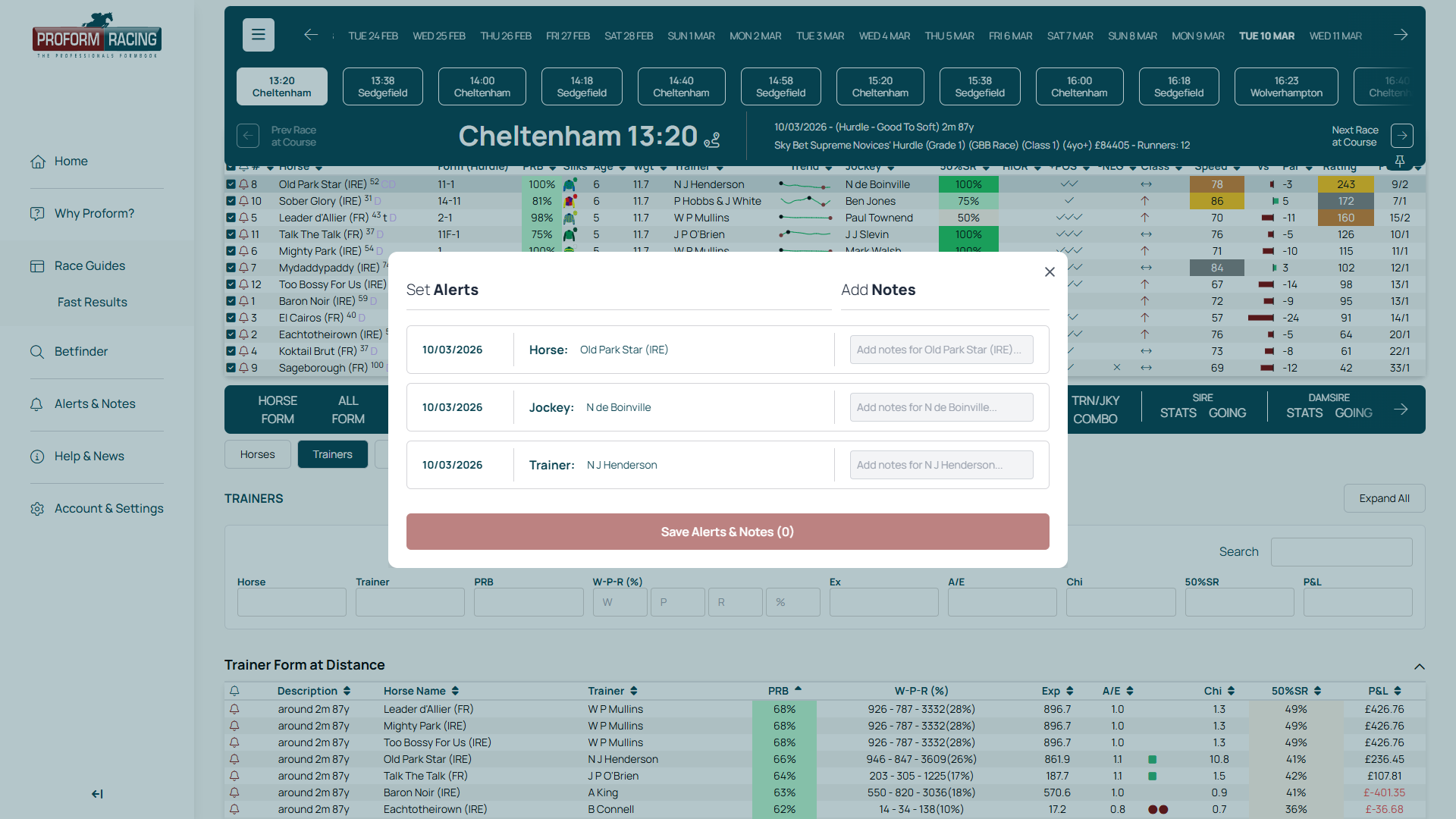
Click Save to store the alert. Your notes are saved to your account and will be visible whenever that alert is triggered.
Step 5 — View & Manage Your Alerts
All your saved stat alerts appear on the Alerts & Notes page. Navigate there from the main menu to see your complete alert list.
Each alert row shows the alert type, participant details, and your personal notes. When a future runner matches one of your saved stats, the alert row is highlighted — making it easy to spot triggered alerts at a glance.
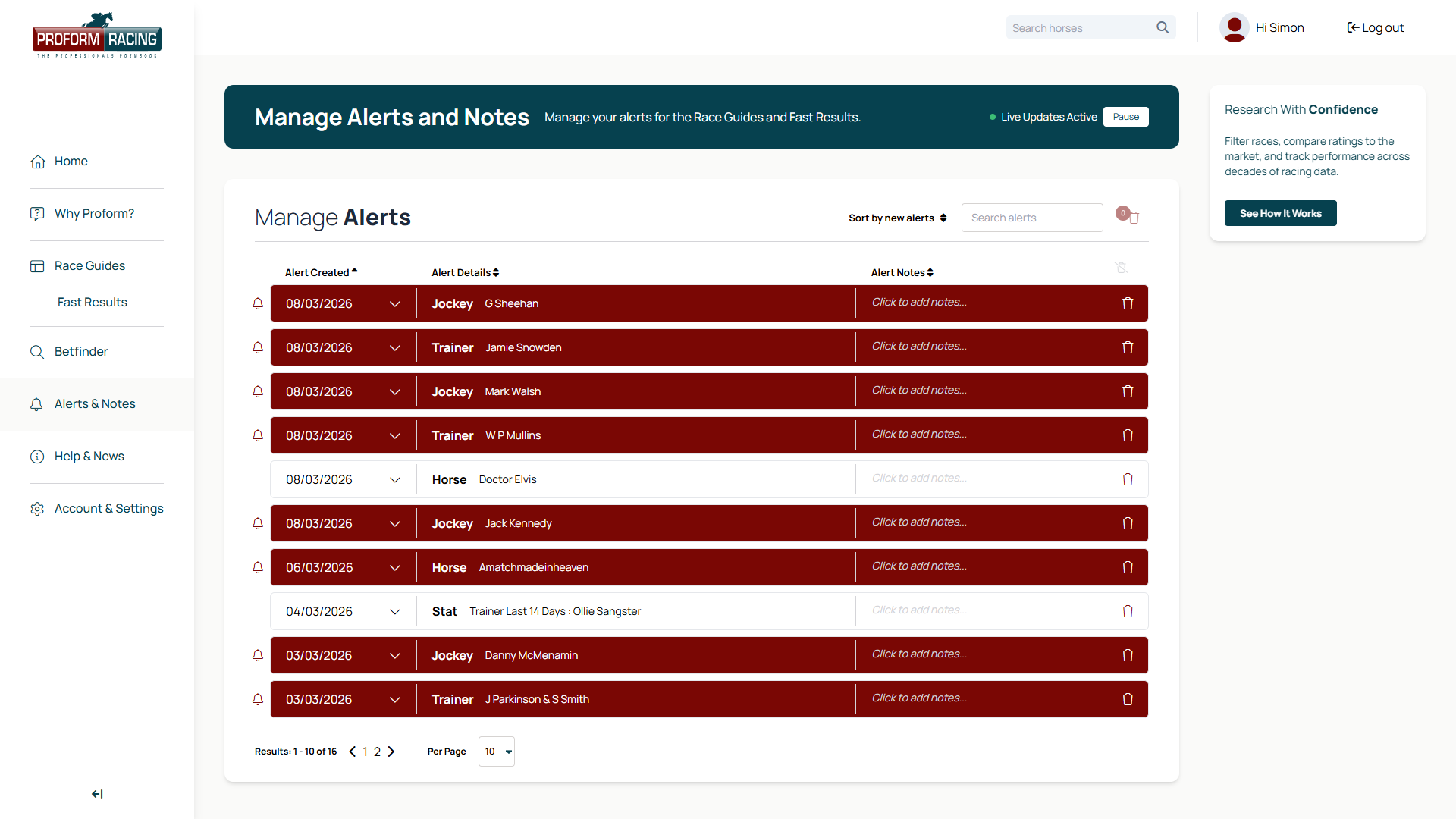
Click any alert row to expand it and see the full race details for triggered alerts, including the course, time, and race name. You can also edit your notes or delete alerts you no longer need.
Step 6 — Email Notifications
The real power of Stat Alerts is the automated notification system. When a runner enters a race that matches one of your saved stats, Proform sends you an email alert. You don’t need to check the site every day — the system watches for you.
How It Works
- ✓You save a stat alert (e.g. “Trainer X — 28% strike rate at 2m in Hurdles”)
- ✓Proform monitors daily race entries against your saved stats
- ✓When a match is found, you receive an email with the race details
- ✓The matching alert is also highlighted on your Alerts & Notes page
Quick Reference
| Action | How To |
|---|---|
| Find Daily Stats | Race Guides → select a race → data tabs row → Daily Stats |
| Switch sub-tabs | Click Trainers, Jockeys, Sire, Damsire, or In Running |
| Save a stat alert | Click the bell icon next to any stat row |
| Add notes | Type in the text inputs in the alert dialog before saving |
| View saved alerts | Navigate to Alerts & Notes from the main menu |
| See triggered alerts | Look for highlighted rows on the Alerts & Notes page |
| Delete an alert | Expand the alert row and click the delete button |
Start Saving Stats as Alerts
Build your personal library of profitable angles — let the system watch for you.
Open Race GuidesProform Racing — The Professional’s Formbook
Save Daily Stats as Alerts — Help Guide